Knowledge Article
How do I reschedule my certification exam?
Author
dania_mourtada
SailPoint
To reschedule a Professional Certification exam that is proctored, you must go to your Proctor360 scheduling link and click "My Sessions" or make sure you are logged into your Proctor360 account and go directly to https://prod1exam.proctor360.com/mysession#/.
Note: Rescheduling due to a no-show will be a $20 charge to the user.
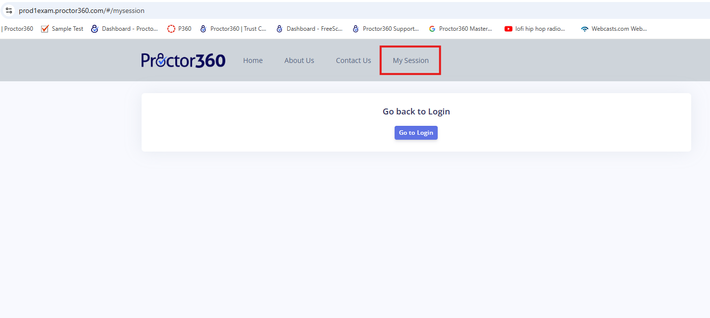
MySessions.png
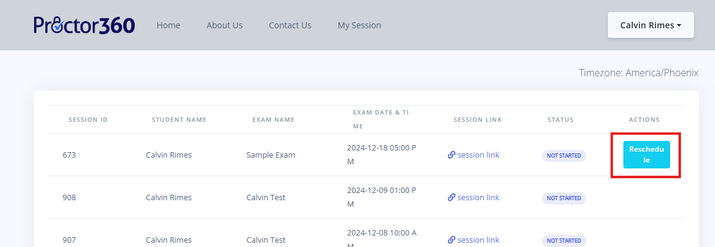
Reschedule.png
- If you are outside of the 48 hour window to when you are supposed to sit for your exam, you can reschedule it free of charge through Proctor360 by going to your Student Session page and selecting Reschedule.
- If you are rescheduling within the 48 hour window, you can reschedule through Proctor360 for a $20 USD fee.
Related Content
I have scheduled my exam with Proctor360, now how do I sit for the exam?Upon scheduling, Proctor360 will send you an email to confirm your scheduled appointment. Follow the steps in the email to complete your system inspection. Step 1 includes a link to start your exam. You will also receive a second email after you complete your system inspection where you can select S...How do I get to Proctor360’s scheduling platform?You must register for your exam in Identity University, then once you register you will see a launch button that will open up a new window and take you directly to Proctor360. You must launch through Identity University to ensure a seamless scheduling and test taking process. You will then receive a...