Knowledge Article
SailPoint eLearning Subscriptions
Author
kristine_manahan
SailPoint
- Subscriptions overview
- What's not included
- How to determine which courses are included
- Identity University Catalog
- How to check subscription availability
- How to buy
- How to assign a subscription to a learner
- How to get started with your subscription
- How to check if subscription is assigned and how to review expiration date
Subscriptions overview
A SailPoint eLearning subscription provides on-demand access to all SailPoint training which includes both role-based and product training. This subscription model is designed to empower teams, foster career advancement, and support targeted skill development. With over 100 on-demand courses in our catalog, learners can engage with content that suits their role and interests.
Benefits of a subscription
- Unlimited Access: Take any eLearning course, anytime, and retake as needed throughout your subscription.
- Subscription Term: Annual subscriptions for individuals; multi-year plans offer added value and allow reassignment at term start for teams.
- Flexibility: Train on your schedule, from any location. Subscriptions can be reassigned if a user leaves (with multi-year plans).
- Access to Knowledge Credentials: Earn credentials through training-based exams that validate your learning.
- Continuous Learning: Stay ahead of the curve; our on-demand content is regularly refreshed to align with SailPoint product updates and releases.
What's not included
SailPoint's on-demand courses are available with an active subscription. However, instructor-led classes and certification exams are not included. These are offered as a-la-carte options to complement your subscription and are available as additional purchases.
How to determine which courses are included
Once assigned to the subscription, select the Catalog tab located at the top. Use the filter feature located to the right and scroll down to Course Type or Cost. Under Course Type, select on-demand. Under Cost, select Subscription. These courses are available with a subscription.
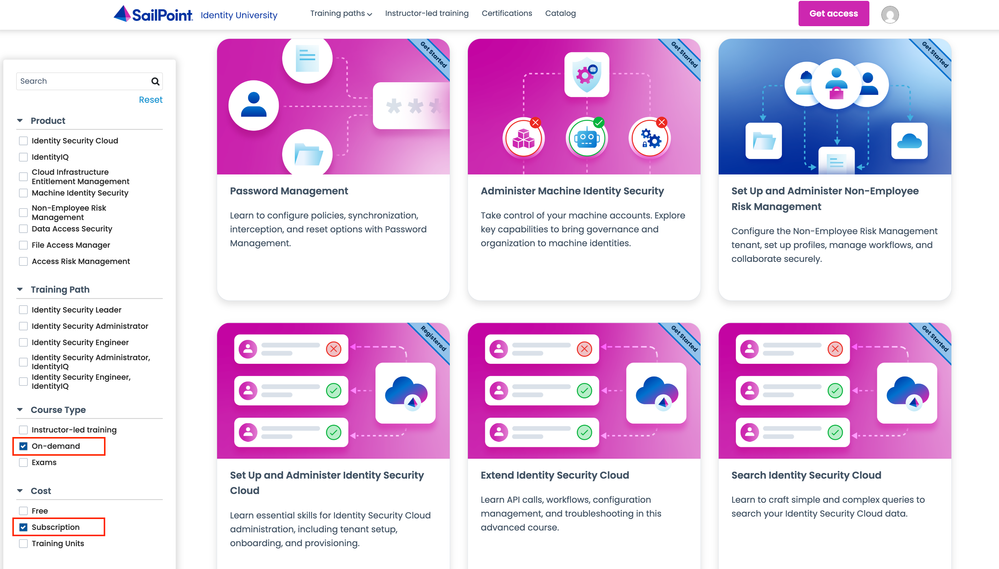
Identity University Catalog
How to check subscription availability
If you are unsure whether your organization has an active training subscription with open seats, reach out to your organization's designated training admin or your Customer Success Manager (CSM). They can confirm your organization’s subscription status and provide details about any available seats.
How to buy
Purchasing a SailPoint eLearning subscription is simple and flexible to suit your needs. You can choose from the following options:
- Request a Quote:
Email training-help@sailpoint.com to request a customized quote tailored to your team or individual training needs. This option is ideal if you:- Plan to purchase with a purchase order
- Interested in multi-year subscription options for long-term access and planning
- Require guidance to align training options with your specific goals.
- Purchase Directly:
Use a credit card to buy training subscriptions quickly and securely through Identity University. This option is best if you are:- Looking for self-serve, immediate purchase option
- Looking for a one-year subscription only
How to assign a subscription to a learner
Subscription seats are assigned to each learner’s profile. To provision a seat, the learner must have an active training profile in Identity University.
Training Admins can easily assign subscription seat(s) to learners in Identity University. Training Admins can review the Training Admin Guide to learn more on how to manage the subscriptions.
How to get started with your subscription
Start with our Training onboarding guide.
How to check if subscription is assigned and how to review expiration date
Log into your training profile and navigate to the profile icon (located to the far right). Select My Profile and under Plans is the subscription name you are assigned to, if assigned to one. You will also see the expiration date of the subscription.