Knowledge Article
IdentityIQ Rights and Capabilities - Definitions
Author
cathy_mallet
SailPoint
- Rights and Capabilities in IdentityIQ
- Mapping Rights to Capabilities
- Definitions of Rights
- Additional Information
Rights and Capabilities in IdentityIQ
IdentityIQ uses a security model based on rights that are granted to users, to control access to product features. These rights (also called SPRights) turn on or off menus, tools, pages, and tabs in the UI, and thus can limit the actions users can take within IdentityIQ.
Capabilities group one or more access rights within IdentityIQ, and are used to group rights logically by job function, streamlining their assignment to users or workgroups.
Rights tend to be limited and granular, and are often used in combination to provide full access to a feature or area of the UI. The granular nature of rights helps administrators fine-tune access – allowing them, for example, to give read-or-view-only privileges to some users in a given feature, but to allow other users full access to that feature, including creating, editing, and deleting data.
There are several ways capabilities can be assigned to users, or used in other ways in IdentityIQ:
- Identities can have capabilities assigned directly to them. This is done via Identities > Identity Warehouse > User Rights tab
- Workgroups can have capabilities assigned to them, and users who are members of the workgroup inherit the capabilities. This is done via Setup > Groups > Workgroups tab
- Certifications can include the capabilities assigned to users as part of the access being reviewed and certified.
- Quicklink Populations can include assigned capabilities as part of their membership criteria; in other words, you can create Quicklink Populations (dynamic scopes) based on assigned capabilities.
Mapping Rights to Capabilities
IdentityIQ provides a wide variety of pre-defined capabilities out of the box. The rights associated with each capability can vary from release to release of IdentityIQ. With each release, SailPoint publishes a matrix of rights and capabilities on Compass.
You can find a list of all these matrices here: IdentityIQ Capabilities Matrix - All Versions
You can also view the rights associated with each capability at the object level, via the Debug Pages.
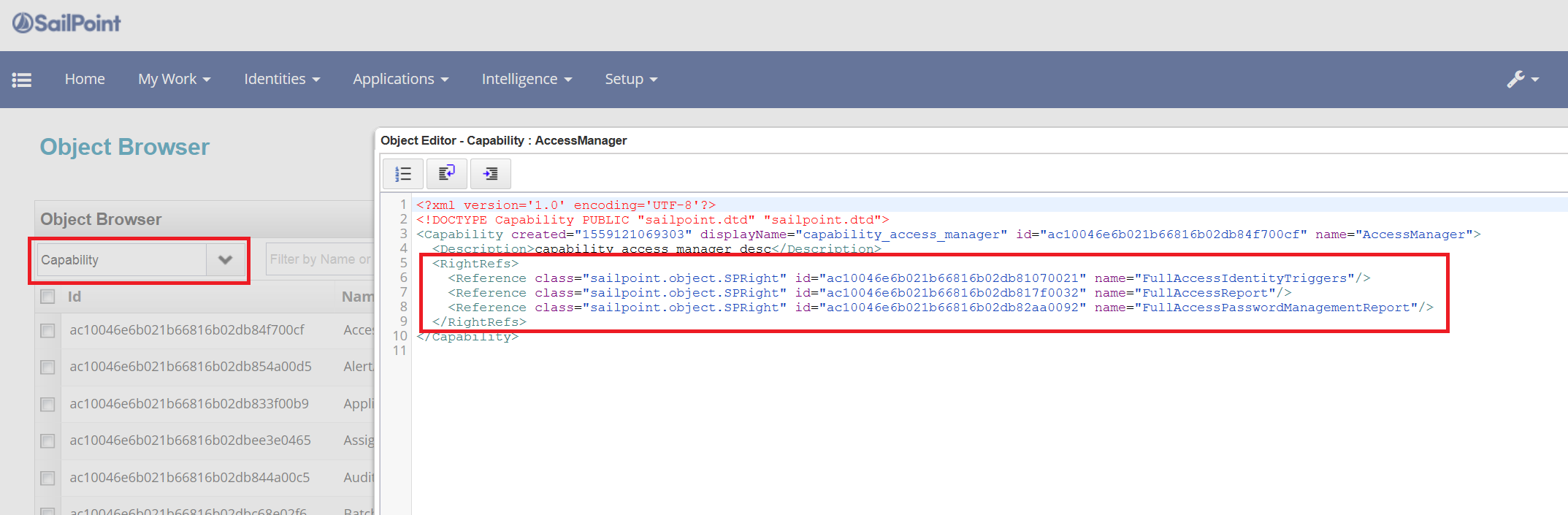
Definitions of Rights
IdentityIQ Feature/UI Rights
These rights control access to features or areas of the UI in IdentityIQ.
GenAIEntitlementAdministrator | Entitlement | New in version 8.5. When combined with the ManagedAttributePropertyAdministrator right, which allows users access to the Entitlement Catalog to view and edit all entitlements, this right allows access to generate GenAI descriptions for Entitlements. |
AccessHistoryFullAccessConfiguration | Access History | New in version 8.4. Allows access to the gear > Global Settings > Access History Configuration page, where users with this right can make configuration changes, save settings, and enable/disable Access History |
AccessHistoryExportIdentityHistory | Access History | New in version 8.4. When combined with the AccessHistoryViewIdentityHistory right, this right gives access to the Export functionality (Export button) on the Access History page |
AccessHistoryViewIdentityHistory | Access History | New in version 8.4. Allows view-only access to the Access History page located at Identities > Identity Access History page |
CertificationCampaignsWidget | Certifications | Adds the Certifications widget to the user's home page, allowing the user to see a list of active certifications; to see certification details, the user also needs the ViewGroupCertification or FullAccessCertifications right. |
CertifyAllCertifications | Certifications | Allows user to view access reviews via a direct link and make decisions on them. Combine with ViewCertifications to allow searching for access review in Advanced Analytics and navigate from there. |
CreatePAMContainer | With this SPRight and the ViewPAMDetail SPRight, the user can create a container and access the QuickLink Menu > Privileged Account Management > Add Container option page. This SPRight can only be used in conjunction with the ViewPAMDetail SPright. In addition, the global setting Enable the creation of PAM containers must be enabled for this SPRight to function. | |
CreateSCIMAlert | Alerts | Allows POST http method operations on the /Alerts endpoint |
DeleteIdentityLink | Identity Warehouse | Gives user access to identities via the Identity Warehouse and Identity View Quicklink, and allows the user to delete application accounts from the Application Accounts tab. Unless this right is combined with others that give fuller access, the user will see only the Attributes, Entitlements, and Application Account tabs for each identity. When combined with the ViewIdentityQuicklink right, the user also gains access to the Identity Warehouse (under the Identities menu). When combined with the ViewIdentity right, the user gains access to Identity Search (under the Intelligence menu). |
DeleteIdentitySnapshot | Identity Warehouse | Gives the user access to identities via the Identity Warehouse and Identity View Quicklink. Unless this right is combined with others that give fuller access, the user will see only the Attributes, Entitlements, and Application Account tabs for each identity. Some information on these tabs, such as the Change Password and Change Forwarding User links, are not shown to the user with only this right. The user can also access the Identity Search feature via Intelligence > Advanced Analytics. When this right is combined with the ViewIdentity right, the user also gains access to all the Identity tabs, and thus has access to Identity Snapshots on the History tab. With this combination of rights, the user can now delete the Snapshots and save the change. |
DeleteSignOffResult | Admin | When combined with the FullAccessTask or FullAccessReport right, this allows the user to delete Tasks and Report Results that have been signed off, or are awaiting signoff. Unless FullAccessTask and FullAccessReport are combined with this right (DeleteSignOffResult), the user can NOT delete Tasks or Report Results, but can delete completed tasks, or terminate pending tasks. |
EditIdentityEntDates | Entitlement | With this right, if there is a sunrise or a sunset date on an entitlement, the user will see a calendar icon on Identities > Identity Warehouse > Entitlements tab, next to that entitlement; the user can change these dates. |
EditScripts | Admin | With this right a user can edit BeanShell scripts in admin screens. As of release 8.3, the ability to edit in-line scripts in IdentityIQ now requires either System Admin access or the new SPRight EditScripts. The EditScripts SPRight is not in any capabilities by default. This means there may be users who were able to edit scripts in the prior versions of IdentityIQ who can no longer edit them, until they have been assigned the new EditScripts SPRight. |
FullAccessAboutPage | Admin | Gives access to the About page, which is accessed via the Debug Pages. Unless this right is combined with other rights, the user does not see the wrench menu (which gives menu access to the About page) and so must navigate to the About page directly (via debug/about.jsf) to view information. |
FullAccessAccountGroupMembershipReport | Report | This right, when combined with the FullAccessReport right, gives access to these reports: Account Group Members Report Account Group Membership Totals Report |
FullAccessAccountMapping | Admin | Gives user view, create, edit, and delete access to Account Mappings in the IdentityIQ Global Settings. |
FullAccessAccountRequestStatusReport | Report | This right, when combined with the FullAccessReport right, gives access to the Account Request Status Report |
FullAccessActivityCategory | Applications | Gives user view, create, edit, and delete access to Activity Target Categories (under the Applications menu). Activity Categories categorize groups of targets from one or more application, and are used with the Activity Search feature to track and monitor activities in your organization. |
FullAccessAdvancedCertificationReport | Report | This right, when combined with the FullAccessReport right, gives access to the Advanced Access Review Live Report |
FullAccessAlertDefinition | Alerts | This right gives access to creating, viewing, and editing Alert Definitions (via Setup > Alerts > Alert Definitions) |
FullAccessApplicationAccountAttributesReport | Report | This right, when combined with the FullAccessReport right, gives access to the Application Account by Attribute Report |
FullAccessApplicationActivityReport | Report | This right, when combined with the FullAccessReport right, gives access to the User Activity Report |
FullAccessApplicationCentricCertificationReport | Report | This right, when combined with the FullAccessReport right, gives access to the Certification Activity by Application Live Report |
FullAccessApplicationOwnerCertificationReport | Report | This right, when combined with the FullAccessReport right, gives access to the Application Owner Access Review Live Report |
FullAccessApplicationReport | Report | This right, when combined with the FullAccessReport right, gives access to these reports: Configured Applications Archive Configured Applications Details and Delimited File Application Status Reports |
FullAccessApplicationRisk | Applications | This right gives access to the Application Risk Scores page (under the Intelligence menu). The user can see applications and risk scores, but can not access application details from the page. |
FullAccessApplicationRiskModel | Applications | Gives the view, create, edit, and delete rights to the Application Risk Model feature (under the Applications menu). The user can edit settings on both the Component Scores tab and the Composite Score tab |
FullAccessApplicationRiskReport | Report | This right, when combined with the FullAccessReport right, gives access to the Application Risk Live Report |
FullAccessApplicationStatusReport | Report | This right, when combined with the FullAccessReport right, gives access to the Application Status Report |
FullAccessApplicationUserReport | Report | This right, when combined with the FullAccessReport right, gives access to these reports: Application Account Summary Report Application Account by Attribute Report User Authentication Question Status Report Users by Application Report |
FullAccessAttributeRequestStatusReport | Report | This right, when combined with the FullAccessReport right, gives access to these reports: Identity Requests Status Report Registration Requests Status Report |
FullAccessAuditConfig | Admin | Gives the user full access to the Audit Configuration page in IdentityIQ Global Settings. The user can edit and save information on every tab. |
FullAccessBatchRequest | Approvals | Gives user full access to the Batch Requests feature (under the Setup menu). The user can create and run batch requests, but unless this user has other rights, any Identity Requests created by a Batch Request initiated by this user will be listed only under My Work > Access Requests, and not in the Access Request widget on the Dashboard. |
FullAccessBeansPage | Admin | Gives access to the Beans page, which is accessed via the Debug Pages. Unless this right is combined with other rights, the user does not see the wrench menu (which gives menu access to the Beans page) and so must navigate to the Beans page directly (via debug/beans.jsf) to view information. |
FullAccessBusinessRoleCompositionReport | Report | This right, when combined with the FullAccessReport right, gives access to the Role Profiles Composition Report |
FullAccessBusinessRoleMembershipReport | Report | This right, when combined with the FullAccessReport right, gives access to the Role Members Report |
FullAccessBusinessRoleReport | Report | This right, when combined with the FullAccessReport right, gives access to these reports: Role Archive Report Role Details Report |
FullAccessCAMConfiguration | When Cloud Access Manager is enabled, this right allows access to the gear > Global Settings > Cloud Access Management Configuration page, and allows the user to configure Cloud Access Management connection information. | |
FullAccessCapabilitiesReport | Report | This right, when combined with the FullAccessReport right, gives access to these reports: Capability to Identities Report, Identity to Capabilities Report |
FullAccessCertificationDecisionReport | Report | This right, when combined with the FullAccessReport right, gives access to the Access Review Decision Report |
FullAccessCertifications | Certifications | Gives access to view active Certifications from the Certification Campaigns widget, if combined with CertificationCampaignsWidget right. The user can view Certification schedule options but can not edit them. The user can view Access Reviews but can not make decisions on them. Combine this right with the ViewCertification right to search for Access Reviews on Advanced Analytics to navigate directly. Combine this right with CertifyAllCertifications to make decisions on access reviews. Combine this right with FullAccessCertificationSchedule to view Certifications from Setup->Certification menu, create/edit certification schedules. |
FullAccessCertificationSchedule | Certifications | This right gives access to the Certifications feature (under the Setup menu), including the three Certification scheduling tabs (Certifications, Certification Schedules, and Certification Events). On the Certifications tab, the user can view the list of Certifications, and can do an Advanced Search, but can not click on individual Certifications to see details. The user can right click on a Certification and change the owner. On the Certification Schedules tab, the user can see scheduled Certifications but can not edit them or click to see more details. The user can right click on a schedule and delete it. On the Certification Events tab, the user can view the list of events but can not create or edit them, or click to see more details. Combine this with FullAccessCertifications to create or edit certification schedules and events, and to view certification details. |
FullAccessCertificationSignoffReport | Report | This right, when combined with the FullAccessReport right, gives access to the Access Review Signoff Report |
FullAccessConnectivityInformationReport | Report | This right, when combined with the FullAccessReport right, gives access to the Connectivity Information Report |
FullAccessDataExtractConfiguration | Admin | New in version 8.4. Allows access to the Data Extract Configuration page in Global Settings, and allows the user to configure Data Extract settings |
FullAccessDatabasePage | Admin | Gives access to the Database page, which is accessed via the Debug Pages. Unless this right is combined with other rights, the user does not see the wrench menu (which gives menu access to the Database page) and so must navigate to the Database page directly (via debug/database.jsf) to view information. |
FullAccessDebugPage | Admin | Grants access to the Debug pages; with this right alone, the wrench menu in the Debug pages includes some but not all menu options; combine this with other rights (such as FullAccessLoggingPage or FullAccessMemoryPage) to add options to the user's view of the wrench menu. |
FullAccessDynamicScope | Admin | Grants access to the Quicklink Population feature in IdentityIQ's Global Settings (gear menu > Global Settings). The user can view, create, edit, and delete Dynamic Scopes (also called Quicklink Populations), but can not view the Quicklinks tab in this feature. |
FullAccessEntitlementOwnerAccessReviewReport | Report | This right, when combined with the FullAccessReport right, gives access to these reports: Account Group Membership Access Review Live Report Account Group Permissions Access Review Live Report & Entitlement Owner Access Review Live Report |
FullAccessEntitlementRequestStatusReport | Report | This right, when combined with the FullAccessReport right, gives access to the Access Request Status Report |
FullAccessEnvironmentInformationReport | Report | This right, when combined with the FullAccessReport right, gives access to the Environment Information Report |
FullAccessEnvironmentMonitoring | Admin | User with this right can view the Environment Monitoring page (under the gear menu > Administrator Console), access the Hosts tab and Applications tab, and perform actions like modifying Host Settings for Services and Configuration. |
FullAccessFAMConfiguration | Admin | This right grants full access to the File Access Manager Configuration page in IdentityIQ Global Settings. |
FullAccessForms | Forms | This right grants access to the Forms page (under the gear menu > Global Settings), allowing the user to create new forms of any type, and edit existing forms. It also allows the user access to centralized forms. |
FullAccessGroup | Populations | Gives access to the Groups feature (under the Setup menu). The user can view, create, edit, and delete groups; can view, edit, and delete but NOT create Populations (Populations are created via the Advanced Analytics feature; and can view, created, edit and delete Workgroups. However, the user can not set Capabilities or Controlled Scopes unless this right is combined with SetWorkgroupCapabilities and/or SetWorkgroupControlledScope rights. |
FullAccessIAIConfiguration | Admin | This right allows you to view and change the values on the Global Settings > IdentityAI Configuration page. |
FullAccessIdentityApplicationRiskReport | Report | This right, when combined with the FullAccessReport right, gives access to the Risky Accounts Report |
FullAccessIdentityCorrelation | Identity Warehouse | Gives access to Identity Correlation (under Identities). |
FullAccessIdentityCubeSummaryReport | Report | This right, when combined with the FullAccessReport right, gives access to the Identity Status Summary Report |
FullAccessIdentityEffectiveAccessReport | Report | This right, when combined with the FullAccessReport right, gives access to the Identity Effective Access Live Report |
FullAccessIdentityEntitlementReport | Report | This right, when combined with the FullAccessReport right, gives access to these reports: Account Attributes Live Report Identity Entitlements Detail Report |
FullAccessIdentityMapping | Identity | This right gives access to the Identity Mappings page (under the gear menu > Global Settings), which lists the identity attributes |
FullAccessIdentityRequest | Approvals | This right gives access to view all Identity Requests in the system, not just those made by this user's identity or for this user's identity |
FullAccessIdentityRisk | Risk Score | Gives user access to the Identity Risk Scores feature (under the Intelligence menu). |
FullAccessIdentityRiskModel | Identity Warehouse | Users with this right can access the Identity Warehouse and see the Attributes, Entitlements, Applications, and Risk Model tabs. The user can not make or save changes to identities. |
FullAccessIdentityRiskReport | Report | This right, when combined with the FullAccessReport right, gives access to the Identity Risk Live Report |
FullAccessIdentityRoleReport | Report | This right, when combined with the FullAccessReport right, gives access to the Identity Role Report |
FullAccessIdentityTriggers | Lifecycle Manager | This right gives the user access to Lifecycle Events (under the Setup menu). A user with this right can also add lifecycle events, and can set event types. |
FullAccessLoggingPage | Admin | Gives access to the Logging page, which is accessed via the Debug Pages. Unless this right is combined with other rights, the user does not see the wrench menu (which gives menu access to the Logging page) and so must navigate to the About page directly (via debug/logging.jsf) to view information. |
FullAccessLoginConfig | Admin | Allows the user to view and edit information on the Login Configuration page (under the gear menu > Global Settings). |
FullAccessManagerCertificationReport | Report | This right, when combined with the FullAccessReport right, gives access to these reports: Manager Access Review Live Report Role Composition Access Review Live Report Role Membership Access Review Live Report |
FullAccessMemoryPage | Admin | Gives access to the Memory page, which is accessed via the Debug Pages. Unless this right is combined with other rights, the user does not see the wrench menu (which gives menu access to the Memory page) and so must navigate to the Memory page directly (via debug/memory.jsf) to view information. |
FullAccessMessageBusConfiguration | Admin | New in version 8.4. Allows access to Message Configuration page in Global Settings, and allows the user to configure the MessageBus settings |
FullAccessMetersPage | Admin | Gives access to the Call Timings page, which is accessed via the Debug Pages. Unless this right is combined with other rights, the user does not see the wrench menu (which gives menu access to the Call Timings page) and so must navigate to the Call Timings page directly (via debug/meters.jsf) to view information. |
FullAccessMitigationReport | Report | This right, when combined with the FullAccessReport right, gives access to the Mitigation Report |
FullAccessOAuthClientConfiguration | Admin | Gives access to the API Configuration page under the gear menu > Global Settings. The user can view, edit, add, and delete settings on this page. |
FullAccessPAM | Privileged Account Management | Gives access to to the QuickLink Menu > Privileged Account Management option. This right is available only if the Privileged Account Management module has been installed and configured. |
FullAccessPasswordManagementReport | Report | This right, when combined with the FullAccessReport right, gives access to the Password Management Requests Report |
FullAccessPlugin | Plugins | Users with this right can access the Plugins page, and install, enable, disable, and uninstall plugins. |
FullAccessPolicyViolation | Policy | Gives user the ability to view and take actions on all Policy Violations, via My Work > Policy Violations. The Policy Violations widget on the Home page will only show the number of Policy Violations owned by the logged-in user. |
FullAccessProvisioningTransaction | Provisioning | Gives the user the ability to see the Provisioning Transaction UI (accessed via the gear menu > Administrator Console), and perform Retry and Override actions on transactions. Unless combined with the FullAccessProvisioningTransactionReport right, the user can not download or run any transaction reports. |
FullAccessProvisioningTransactionDetailedReport | Report | This right, along with the FullAccessReport and FullAccessProvisioningTransaction rights, gives access to the Detailed Provisioning Transaction Object Report |
FullAccessProvisioningTransactionReport | Report | This right, along with the FullAccessReport and FullAccessProvisioningTransaction rights, gives access to the Provisioning Transaction Object Report, and also allows the user to download the report from the Administrator Console page. |
FullAccessRapidSetup | When Rapid Setup is enabled, this right allows access to the Applications > Rapid Setup page, with edit privileges | |
FullAccessRapidSetupConfiguration | When Rapid Setup is enabled, this right allows access to the gear > Global Settings > Rapid Setup Configuration page, with edit privileges | |
FullAccessRemediationProgressReport | Report | This right, when combined with the FullAccessReport right, gives access to the Revocation Live Report |
FullAccessReport | Report | This right on its own gives the user the right to access the Reports page under the Intelligence menu. The user can see all report tabs, but does not have access to the specific reports; combine this right with specific report-related rights to allow the user to run a report and view results. |
FullAccessRequest | Approvals | This right lets the user view pending Requests; the user can not cancel or otherwise change requests. |
FullAccessRoleChangeMgmtReport | Report | This right, when combined with the FullAccessReport right, gives access to the Role Change History Report. |
FullAccessRoleEntitlementsReport | Report | This right, when combined with the FullAccessReport right, gives access to the Roles by Entitlement Report. |
FullAccessRoleMining | Role Mining | This right is used in combination with ManageRole, to give the user access to Roles (under the Setup menu) and the tabs in the Role page, including Role Mining and Role Mining Results. Unless it is combined with ManageRole, this right does not give the user access to any Role Mining features. |
FullAccessSystemConfig | Admin | This right gives access to some pages unders Global Settings, as well as in Lifecycle Manager and Compliance Manager: In Global Settings - IdentityIQ Configuration: access to view and edit all tabs (Mail Settings, Work Items, Identites, Roles, Passwords and Miscellaneous) - Role Configuration: view, create, edit, and delete capabilities on Role Attributes and Role Types - Application Configuration: view, create, edit, and delete capabilities on Application Attributes. - Electronic Signatures: Can view the Electronic Signatures page but can not take any actions. -Entitlement Catalog Configuration: view, create, edit, and delete capabilities on Entitlement Catalog Attributes - Host Configuration - can view the page but the user does not see host configuration details. In Lifecycle Manager: access to view and edit all tabs (Configure, Business Processes & Identity Provisioning Policies) In Compliance Manager: access to view and edit configuration for Compliance Manager |
FullAccessTargetedAccessReviewReport | Report | This right, when combined with the FullAccessReport right, gives access to the Targeted Access Review Live Report |
FullAccessTask | Admin | Gives the user access to Task Definitions, Scheduled Tasks, and Task Results (via Setup > Tasks). The user can create, edit, delete, and run task definitions and task schedules. On Tasks and Task Results, this right allows access to any task and any task result (with the ability to delete or terminate results that are not signed off or are awaiting signoff). On Scheduled Tasks, however, the user can see and manage only the task schedules they own (that they created), not schedules owned by other users. This right does not grant access to the Signoff Status widget. |
FullAccessTaskManagement | Admin | User with this right can view the Task page in the Administrator Console (accessed via the gear menu), and perform actions like Postpone and Terminate. |
FullAccessTerminateIdentity | When Rapid Setup is enabled, this right allows access to the Identities > Identity Operations page, with the ability to terminate an identity. | |
FullAccessThreadsPage | Admin | Gives access to the Threads page, which is accessed via the Debug Pages. Unless this right is combined with other rights, the user does not see the wrench menu (which gives menu access to the Threads page) and so must navigate to the Threads page directly (via debug/threads.jsf) to view information. |
FullAccessTimePeriod | Admin | Gives access to the Time Periods page (via gear menu > Global Configuration), allowing the user to view and edit the configuration of time periods. |
FullAccessUncorrelatedIdentitiesReport | Report | This right, when combined with the FullAccessReport right, gives access to the Uncorrelated Accounts Report |
FullAccessUserReport | Report | This right, when combined with the FullAccessReport right, gives access to these reports: Identity Forwarding Report Privileged Access Report and User Details Report |
FullAccessViolationReport | Report | This right, when combined with the FullAccessReport right, gives access to the Policy Violation Report |
FullAccessWorkflows | Workflow | This right gives access to the Business Process Editor (under the Setup menu), including create, read, edit, and delete capabilities on all workflows. |
FullAccessWorkItemReport | Report | This right, when combined with the FullAccessReport right, gives access to the Work Item Archive Report |
FullAccessWorkItems | Work Item | This right allows the user to view and manage all workItems/workItemArchive objects. |
FullAccessBatchRequest | This right gives a user access to the Setup > Batch Requests page and allows the user to upload and execute batch requests. This is the only right in Batch Request Administrator capability. Identity Requests created by batch requests initiated by the user are listed in My Work > Access Requests. | |
ImportFromFile | Allows the user to import a file through the gear menu > Global Settings > Import From File option. | |
IQServicePublicKeyExchangeTask | Task | Allows the user to execute and view the result of the IQService Public Key Exchange Task. |
ManageIAICommonAccessDiscovery | Access Modeling | New in version 8.4. When combined with the ViewIdentity right, which allows access to the Advanced Analytics > Identity search page, this right allows access to the Discover Common Access Roles button. |
ManageIAISpecializedRoleDiscovery | Access Modeling | New in version 8.4. When combined with the ViewIdentity right, which allows access to the Advanced Analytics > Identity search page, this right allows access to the Discover Specialized Roles button. |
ManageApplication | Applications | Gives user the ability to view, create, edit and delete Application Definitions (under the Applications menu). |
ManageBusinessRoles | Roles | When combined with the ManageRole right, allows the user to create Business Roles. The user has access to Setup > Roles, and can see three of the Roles tabs: Role Viewer Role Search Entitlement Analysis |
ManagedAttributePropertyAdministrator | Entitlement | Gives access to the Entitlement Catalog (under the Applications menu). Users with this right can view and edit all entitlements. This user can also import and export entitlements via CSV. |
ManagedAttributeProvisioningAdministrator | Entitlement | Gives access to the Entitlement Catalog (under the Applications menu). Users with this right can edit all entitlements. The user can also import (including creating via import) and export entitlements via CSV. |
ManageEntitlementRoles | Roles | When combined with the ManageRole right, allows the user to create Entitlement Roles. The user has access to Setup > Roles, and can see three of the Roles tabs: Role Viewer Role Search Entitlement Analysis |
ManageHelpDeskRequests | Admin | This right gives access to any Lifecycle Manager Quicklinks that are enabled for the Help Desk Quicklink population. |
ManageITRoles | Roles | When combined with the ManageRole right, allows the user to create IT Roles. The user has access to Setup > Roles, and can see three of the Roles tabs: Role Viewer Role Search Entitlement Analysis |
ManageOrganizationalRoles | Roles | When combined with the ManageRole right, allows the user to create Organizational Roles. The user has access to Setup > Roles, and can see three of the Roles tabs: Role Viewer Role Search Entitlement Analysis |
ManagePolicy | Policy | Gives the user access to the Policies page (under the Setup menu), with view, create, edit, and delete capabilities on Policies. This right does not give access to any additional pages or widgets for Policy Violations. |
ManageRapidSetupBirthrightRoles | Available when Rapid Setup is enabled. Along with ManageRole right, this right gives access to Setup > Roles. The right also allows a user to create a RapidSetup Birthright Role and gives access to all 3 tabs: Role Viewer, Role Search, and Entitlement Analysis. | |
ManageRole | Roles | Gives access to the Roles feature (under the Setup menu); users with this righ can create Roles but can not associate the role with any type. The user also can not add Assignment Rules, Required Roles, Permitted Roles, Inherited Roles, or Entitlements. Combine this right with the rights as shown below to add more access: ManageRole + ManageITRoles rights allows the user to create IT Roles. ManageRole + ManageOrganizationalRoles rights alllows the user to create Organizational Roles. ManageRole + ManageBusinessRoles rights allows the user to create Business Roles ManageRole + ManageEntitlementRoles rights allows the user to create Entitlements. |
ManageRules | Rules | This right enables user to create and edit rules. |
ManageScope | Admin | Gives the user access to Scopes (under the gear menu > Global Settings), with view, create, edit, and delete capabilities on scope objects, and the ability to enable, disable, and configure scope settings. |
ManageWorkgroup | Workgroups | Gives access to the Workgroup tab in the Groups feature (under the Setup menu). This right alone gives view, create, edit, and delete rights on Workgroups, but does not allow the user to view or edit capabilities or scopes. Combine this right with the SetWorkgroupCapability and/or SetWorkgroupControlledScopes rights to allow viewing and editing of capabilities and/or scopes. |
MonitorIdentityActivity | Identity Warehouse | Users with this right can access the Identity Warehouse and view the Attributes, Entitlements, Applications, and Activity tabs. Certain elements of these tabs are not visible to users with this right alone: the Attributes tab does not include Edit, Change Password, and Change Forwarding User links. |
MonitorIdentityEvents | Identity | Gives access to the View Identity Quicklink and the Direct Reports widgets, but not to the Identity Warehouse menu option. Via these access points, the user can see the Attributes, Entitlements, Applications, and Events tabs for an Identity. Certain elements of these tabs are not visible to users with this right alone: - The Events tab shows events only, and does not show Access Request data.. - The Attributes tab does not include Edit, Change Password, and Change Forwarding User links. |
MonitorIdentityHistory | Identity | Gives access to the View Identity Quicklink and the Direct Reports widgets, but not to the Identity Warehouse menu option. Via these access points, the user can see the Attributes, Entitlements, Applications, and History tabs for an Identity. Certain elements of these tabs are not visible to users with this right alone: - The History tab shows snapshots, but the user can not click on a snapshot to see more details, and can not delete the snapshot. However the user can see Certification History, and can download history in CSV or PDF format. - The Attributes tab does not include Edit, Change Password, and Change Forwarding User links. |
MonitorIdentityPolicy | Identity | Gives access to the View Identity Quicklink and the Direct Reports widgets, but not to the Identity Warehouse menu option. Via these access points, the user can see the Attributes, Entitlements, Applications, and Policy tabs for an Identity. On the Policy tab, the user can click the links to view details. The Attributes tab does not include Edit, Change Password, and Change Forwarding User links. |
MoveIdentityLink | Identity | This right allows the user to move accounts of identities. Gives access to the Identity Warehouse. In the Identity Warehouse, this right (in conjunction with ViewIdentity right) will enable the Move Account button and the account checkboxes in the Application Accounts tab. |
PAMModifyIdentities | When the global setting Enable adding and removing identities in PAM containers option is enabled, this right gives a user the ability to add or remove identities from a container. This function is accessed through the QuickLink Menu > Privileged Account Management > Container Card > Identities tab > Add/Remove Identities This SPRight can only be used in conjunction with the ViewPAMDetail SPRight. | |
PAMModifyPrivilegedItems | When the global setting Enable adding and removing privileged items in PAM containers option is enabled, this right gives a user the ability to add and remove privileged items from a container. This function is accessed through the QuickLink Menu > Privileged Account Management > Container Card > Privileged Items tab > Add/Remove Privileged Items This SPRight can only be used in conjunction with the ViewPAMDetail SPRight. | |
ReadSCIMAlert | Alerts | Allows GET http method operations on the /Alerts endpoint |
ReadTaskResults | Admin | Gives access to Task Results (under Setup > Tasks); with this right alone, the user can not schedule or run any tasks. Combine this right with FullAccessTask to give the user access to the Tasks and Schedule Task tabs, which allow the user to schedule and run tasks. |
SetIdentityAttribute | Identity | The SetIdentityAttribute right allows the user to edit the attributes of identities. In the Identity Warehouse, this right (along with ViewIdentity right) will enable the Edit link in the Attributes tab. This right does not enable any menu items -- it only enhances what is available within the pages mentioned above. |
SetIdentityCapability | Identity | This right allows the user to make changes to he capabilities of identities. This is only respected from within the Identity Warehouse. If the logged-in user has SetIdentityCapability right (as well as the ViewIdentity right), then he/she will be able to see and manage the capabilities under the User Rights tab. |
SetIdentityControlledScope | Identity | The SetIdentityControlledScope right allows the user to change the scope settings for identities. The right gives access to the Identity Warehouse. In the Identity Warehouse, this right (along with the ViewIdentity right) will enable the ability to change the scope setting for an identity, under the User Right tabs. This right does not enable any menu items -- it only enhances what is available within the pages mentioned above. |
SetIdentityForwarding | Identity | The SetIdentityForwarding right allows the user to change the forwarding settings for identities. The forwarding settings can be changed from the Identity Details page, or from the Identity Warehouse. The Identity Details can be viewed from the View Identity or Edit Identity Quicklinks, and the Direct Reports widget. If the logged-in user has the SetIdentityForwarding right, then the Forwarding link will be available to change the user's forwarding settings. In the Identity Warehouse, if the logged in user has the SetIdentityForwarding right (along with the ViewIdentity right), then the Change Forwarding User link will be available to change the user's forwarding settings. This right does not enable any menu items -- it only enhances what is available within the pages mentioned above. |
SetIdentityPassword | Identity | The SetIdentityPassword right allows the user to change passwords for identities. This right gives access to the Identity Warehouse. In the Identity Warehouse, this right (along with the ViewIdentity right) will enable the Change Password option at the bottom of the Attributes tab. In the Identity Details page (from Edit Identity and View Identity Quicklinks), the right enables the Change Password option. |
SetIdentityRights | Identity | Does nothing on its own; is paired with ControlledScopes and/or Capabilities. |
SetIdentityRole | Identity | The SetIdentityRole right controls the ability to make changes to the sunrise and sunset dates of existing role assignments. This is only respected from within the Identity Warehouse when viewing an identity's roles. If the logged-in user has the SetIdentityRole right (as well as the ViewIdentity right), then he/she is able to change the sunrise and sunset dates of roles. |
SetWorkgroupCapability | Workgroups | Combine this right with FullAccessGroups OR ManageWorkgroups to allow the user to set capabilities for workgroups. This right will also show controlled scopes, if scopes are enabled; however, you can not make and save changes to scopes. |
SetWorkgroupControlledScope | Workgroups | When combined with FullAccessGroups OR ManageWorkgroup, this right allows controlled scopes to be set (when scopes are enabled), and allows the saving of controlled scopes. |
SyncEncryptedDataTask | Admin | Allows the user to execute and view the result of the Encrypted Data Synchronization Task |
UnlockIdentity | Identity | The UnlockIdentity right controls the ability to unlock another identity's account. An unlock of an identity can be performed from the Identity Details page, or from the Identity Warehouse. The Identity Details page can be viewed from the View Identity or Edit Identity Quicklinks, and the Direct Reports widget. If the logged-in user has the UnlockIdentity right, then a Locked badge and an Unlock button will appear when viewing the identity Details of a locked identity. (Otherwise, the Locked badge and Unlock button will not appear.) Once the button is used to unlock the account, it no longer appears. For the Identity Warehouse, if the logged-in user has the UnlockIdentity right (as well as the ViewIdentity right), then an Unlock User link will appear at the bottom of the View Identity page if the identity being viewed is currently locked. This right does not enable any menu items -- it only enhances what is available within the pages mentioned above. |
ViewAccessAboutPage | Admin | New in version 8.4. Allows users to view the About page (wrench icon > About) with Read Only privileges. Note that there are no actions that can be made on the page. |
ViewAccessActiveMQPage | Admin | New in version 8.4. Allows users to view the ActiveMQ Monitoring page (wrench icon > ActiveMQ Monitoring) with Read Only access. The user can select the Subscriptions button which will display a read only list of ActiveMQ subscriptions. |
ViewAccessBeansPage | Admin | New in version 8.4. Allows users to view the Manged Beans page (wrench icon > Beans) with Read Only access. There are no actions that can be made on the page. |
ViewAccessCachesPage | Admin | New in version 8.4. Allows users to view the System Caches page (wrench icon > Caches) with Read Only access. Users are not able to select the "Reset Miscellaneous Caches", "Reset Managed Attribute Cache", "Load Managed Attribute Cache", "Dump Managed Attribute Cache", or "Reset IntegreationConfig Cache" options. |
ViewAccessCountPage | Admin | New in version 8.4. Allows users to view the Object Count page (wrench icon > Counts) with Read Only access. There are no actions that can be made on the page |
ViewAccessDatabasePage | Admin | New in version 8.4. Allows users to view the Database Properties page (wrench icon > Database) with Read Only access. Users are not able to select the "Refresh" button. |
ViewAccessDebugPage | Admin | New in version 8.4. Allows users to view the Object browser (wrench icon > Object) and Database Connections page (wrench icon > Connections), with Read Only access. Users are not able to select and run rules, or to create, delete, or save modifications made to files in the Debug object browser. There are no actions that can be made on the Connections page. |
ViewAccessLoggingPage | Admin | New in version 8.4. Allows users to view the Logging page (wrench icon > Logging) with Read Only access. Users are not able to select the "Reload Logging Configuration" button. |
ViewAccessMemoryPage | Admin | New in version 8.4. Allows users to view the JVM Memory page (wrench icon > Memory) with Read Only access. Users are not able to select the "Run Finalizers" and the "Run Garbage Collector" buttons. |
ViewAccessMetersGridPage | Admin | New in version 8.4. Allows users to view the Call Timings page (wrench icon > Call Timings) with Read Only access. Users are not able to select the "Reset Meters" button. |
ViewAccessThreadsPage | Admin | New in version 8.4. Allows users to view the IdentityIQ Threads page (wrench icon > Threads) with Read Only access.There are no actions that can be made on the page. |
ViewAccountGroups | Groups | Gives access to the Entitlement Search option in Advanced Analytics (under the Intelligence menu). The user can use the search feature and view search results in a list form, but can not make or save changes. |
ViewActivity | Report | Gives access to the Activity Search option in Advanced Analytics (under the Intelligence menu). The user can use the search feature and view search results in a list form, but can not click through to more details. |
ViewAlert | Alerts | Gives view-only access to the Alerts tab (under Setup > Alerts). |
ViewAlertDefinition | Alerts | Gives view-only access to the Alert Definitions tab (under Setup > Alerts). |
ViewApplication | Applications | Gives view-only access to Application Definitions (under the Applications menu). |
ViewApplicationRiskScoreChart | Applications | This right gives the user access to the Risk Chart for Applications widget, which lists the 5 applications with the highest risk scores.This right on its own also gives access to the more detailed Risk Scores page. |
ViewAttributeDetails | This right is used in conjunction with the ViewApplication SPRight to allow access to view Application Account Group Details. | |
ViewAuditLog | Admin | This right gives the user access to the Audit Search feature (under the Intelligence menu). The user can view a list of Audit Searches in a grid, and can click through to more information if any exists. |
ViewCertificationCompletionChart | Certifications | This right on its own gives access the Access Review Completion Chart widget for identities that own certifications. For identities that don't own Access Reviews, this right must be combined with the ViewDashboardChooser right to give the user access to the Access Review Completion Chart widget. Note: This right was removed in version 8.0 of IdentityIQ, with the removal of dashboard features. |
ViewCertificationCompletionStatus | Certifications | This right on its own gives access the Access Review Completion Status widget for identities that own certifications. For identities that don't own Access Reviews, this right must be combined with the ViewDashboardChooser right to give the user access to the Access Review Completion Status widget. Note: This right was removed in version 8.0 of IdentityIQ, with the removal of dashboard features. |
ViewCertificationDecisionChart | Certifications | This right on its own gives access the Access Review Decision Chart widget for identities that own certifications. For identities that don't own Access Reviews, this right must be combined with the ViewDashboardChooser right to give the user access to the Access Review Decision Chart widget. Note: This right was removed in version 8.0 of IdentityIQ, with the removal of dashboard features. |
ViewCertificationOwnerStatus | Certifications | This right on its own gives the user access to the Access Review Owner Status by Group widget for any certifications this user owns; the user can view a summary of any Access Review listed, but can only view or forward Access Reviews that are in the hierarchy of certifications the user owns. For identities that don't own Access Reviews, combine this right with the ViewDashboardChooser right to give the user access to the Access Review Owner Status by Group widget; the user can then view the summary for any Access Review, but can not view Access Review details or forward Access Reviews. Note: This right was removed in version 8.0 of IdentityIQ, with the removal of dashboard features. |
ViewCertifications | Certifications | Gives access to the Access Review search feature in Advanced Analytics (under the Intelligence menu). The user can not click into the result row to view the access review contents. Combine with FullAccessCertifications to view access reviews, or CertifyAllCertifications to make decisions in access reviews. |
ViewCertificationsDashboardGrid | Certifications | This right gives access to the Compliance Dashboard and the Certification widget, for any certifications owned by the user. Note: This right was removed in version 8.0 of IdentityIQ, with the removal of dashboard features. |
ViewDashboardChooser | Dashboard | This right is not used on its own; it is combined with other rights, such as ViewSignoff Result to give the user access to the corresponding dashboard widget. Note: This right was removed in version 8.0 of IdentityIQ, with the removal of dashboard features. |
ViewEnvironmentMonitoring | Admin | User with this right can view the Administrator Console's Environment Monitoring page, seeing both the Hosts tab and the Applications tab. However, the user can not perform any actions in this page, such as modifying Host Settings for Services and Configuration. |
ViewFAMNavigationMenu | Data Governance | Allows the user to access the Data Governance navigation menu (for integration with File Access Manager). |
ViewFAMAdminWidgets | Data Governance | Allows the user to view File Access Manager widgets on the IdentityIQ home page. |
ViewGroupCertification | Certifications | Combine this right with CertificationCampaignsWidget to give the user view access to active certifications; the user can click "All" button in the Certifications widget, and can click on the titles of individual Certification groups in the widget to see more detail. |
ViewGroupCertificationStatus | Certifications | This right on its own gives the user access to the Group Access Review Status widget for any certifications this user owns; the user can view a summary of any Access Review listed, but can only view or forward Access Reviews that are in the hierarchy of certifications the user owns. For identities that don't own Access Reviews, combine this right with the ViewDashboardChooser right to give the user access to the Group Access Review Status widget; the user can then view the summary for any Access Review, and can forward Access Reviews. Note: This right was removed in version 8.0 of IdentityIQ, with the removal of dashboard features. |
ViewGroups | Groups | Users with this right can view the Groups tab only (but not the Populations or Workgroups tabs) in the Groups feature (under the Setup menu). The user can only view groups and their details, and can not create, edit, or delete groups. |
ViewIdentity | Identity Warehouse | Gives view-only access to the Identity Warehouse. The user can view all the tabs for an Identity, but does not have the ability to edit information. This right also gives the user access to the Identity Search option via the Intelligence > Advanced Analytics menu. |
ViewIdentityRequest | Approvals | Users with this right can access the Access Request search under Intelligence > Advanced Analytics, and can view identity requests through the Access Request search. However, with this right alone, the user's Access Requests page under My Work will only show requests where the user is Owner, Requester, or Requestee. |
ViewLink | Report | Users with this right can access the Account search under Intelligence > Advanced Analytics. Results are displayed in a grid view, but the user can not click results to view more details. |
ViewOAuthClientConfiguration | Admin | Gives view-only access to the API Authentication page (under the gear menu > Global Settings menu option) |
ViewPAMDetail | This right alone allows view-only access to the Privileged Account Management page (QuickLink Menu > Privileged Account Management). It can also be combined with other SPRights and global settings to fine-tune what the user can edit in Privileged Account Management. | |
ViewPolicy | Policy | Gives view-only access to the Policies page (under the Setup menu). The user can view Policies in the grid, and can click on a Policy to view details. |
ViewPopulations | Populations | Gives view-only access to the Populations tab (under Setup > Groups). The user can view Populations in the grid, and can click on a Population to view details. |
ViewProcessInstrumentation | Report | Users with this right can access the Process Metrics search under Intelligence > Advanced Analytics |
ViewProvisioningTransaction | Provisioning | Gives access to the Provisioning Transaction table in the Administrator Console (accessed via the gear menu). The user can only view provisioning transcations, and can not take Retry or Override actions, and can not download or run any reports. |
ViewQuickLinks | Quicklinks | Allows the user to view Quicklink Populations (under gear menu > Global Settings). On its own this right only allows the user to view Quicklink Populations; it must be combined with the FullAccessDynamicScope right in order for the user to be able to view, create, edit, and delete Quicklink Populations. |
ViewRapidSetup | When Rapid Setup is enabled, this right allows view-only access to the Rapid Setup page, without edit privileges. | |
ViewRapidSetupConfiguration | When Rapid Setup is enabled, this right allows view-only access to the Rapid Setup Configuration page (gear menu > Global Settings > Rapid Setup Configuration), without edit privileges. | |
ViewRiskScoreChart | Risk Score | This right on its own adds the Risk Score chart for Identities to the user's Home page; the chart lists the five identities with the highest risk score. Unless this right is combined with the ViewDashboardChooser right, the user will only be able to view the chart on the Home page, and can not click All to see more details. If this right is combined with the ViewApplicationRiskScoreChart, the Risk Score chart will show both identities and applications with top-5 risk scores. |
ViewRole | Roles | This right on its own gives access to Role search (under Intelligence > Advanced Analytics). Combine it with the ManageRole right to allow the user to add new roles. |
ViewScope | Scopes | This right gives the user access to Scopes (under the gear menu > Global Settings option). With this right, the user can enable, disable, or configure Scope settings, but can not create, edit, or delete Scope objects. |
ViewSyslog | Report | Gives the user access to Syslog search (in Intelligence > Advanced Analytics), allowing the user to search and view details of syslog events. |
ViewTaskManagement | Admin | This right gives view-only access to the Administrator Console's Tasks page; with this right alone, the user can not launch new tasks or view detailed task results, nor perform actions such as postponing or terminating tasks. |
ViewWorkgroup | Workgroups | This right gives read-only access to the Workgroups tab (via Setup > Groups). This right can be combined with the SetWorkgroupCapability to show capabilities and scopes (if scopes are enabled) |
SCIM API Rights
SCIM API rights grant access to various IdentityIQ SCIM API endpoints. By default, all these rights are included with the out-of-the-box SCIM Executor capability.
CreateSCIMAccount | Allows POST http method operations on the /Accounts endpoint |
CreateSCIMCheckedPolicyViolation | Allows POST http method operations on the /CheckedPolicyViolations endpoint |
CreateSCIMLaunchedWorkflow | Allows POST http method operations on the /LaunchedWorkflows endpoint |
CreateSCIMUser | Allows POST http method operations on the /Users endpoint |
DeleteSCIMAccount | Allows DELETE http method operations on the /Accounts endpoint |
DeleteSCIMUser | Allows DELETE http method operations on the /Users endpoint |
ReadSCIMAccount | Allows GET http method operations on the /Accounts and /Accounts/{id} endpoints |
ReadSCIMApplication | Allows GET http method operations on the /Applications and /Applications/{id} endpoints |
ReadSCIMCheckedPolicyViolation | Allows GET http method operations on the /CheckedPolicyViolations and /CheckedPolicyViolations/{id} endpoints |
ReadSCIMEntitlement | Allows GET http method operations on the /Entitlements and /Entitlements/{id} endpoints |
ReadSCIMLaunchedWorkflow | Allows GET http method operations on the /LaunchedWorkflows and /LaunchedWorkflows/{id} endpoints |
ReadSCIMObjectConfig | Allows GET http method operations on the /ObjectConfigs and /ObjectConfigs/{id} endpoints |
ReadSCIMPolicyViolation | Allows GET http method operations on the /PolicyViolations and /PolicyViolations/{id} endpoints |
ReadSCIMResourceType | Allows GET http method operations on the /ResourceTypes and /ResourceTypes/{id} endpoints |
ReadSCIMRole | Allows GET http method operations on the /Roles and /Roles/{id} endpoints |
ReadSCIMSchema | Allows GET http method operations on the /Schemas and /Schemas/{id} endpoints |
ReadSCIMTaskResult | Allows GET http method operations on the /TaskResults and /TaskResults/{id} endpoints |
ReadSCIMUser | Allows GET http method operations on the /Users and /Users/{id} endpoints |
ReadSCIMWorkflow | Allows GET http method operations on the /Workflows and /Workflows/{id} endpoints |
UpdateSCIMAccount | Allows PUT http method operations on the /Accounts/{id} endpoint |
UpdateSCIMUser | Allows PUT http method operations on the /Users/{id} endpoint |
Web Services/REST API Rights
Web Services rights grant access to various IdentityIQ web services endpoints. By default, all these rights are included with the out-of-the-box WebServices Executor capability.
AggregateAccountWebService | Allows user to aggregate the given resource object for the given application onto the given identity, by granting access to the rest/aggregate endpoint |
CancelWorkflowWebService | Not used. |
CheckAuthorizationWebService | Allows user to check whether the request identity has the given right, by granting access to the rest/checkAuthorization endpoint. |
CheckPasswordPolicyWebService | Allows user to check the given credentials against the password policies, by granting access to the rest/policies/checkPasswordPolicies endpoint |
CheckRolePoliciesWebService | Allows user to check whether assigning the given roles to the given identity would result in role policy violations, by granting access to the rest/policies/checkRolePolicies endpoint. |
GetConfigurationWebService | Allows user to retrieve a SystemConfiguration attribute's value, by granting access to the rest /configuration endpoint. |
GetIdentityListWebService | Allows user to return a list of identities that the given identity can "manage", by granting access to the rest/identities/{identityName}/managedIdentities endpoint. This includes identities that are under the given identity in the manager hierarchy or all identities (within scope) if the identity is an IdentityAdministrator. |
GetIdentityNameByLinkWebService | Allows user to return the Identity Cube name for given Link, by granting access to the rest/identities/findByAccount endpoint. |
GetLinksWebService | Not used. |
GetTaskResultStatusWebService | Allows user to return a RequestResult that is based on the TaskResult object, by granting access to the rest/status/ endpoint. This service is used by IRM integration to check the status of existing workflows. |
GetWorkItemCountWebService | Allows user to return the count for given work item type, by granting access to the rest/identities/{identityNameOrId}/workItemCount endpoint. |
IdentityCreateOrUpdateWebService | Allows user to create or update the given identity with the attributes in the given map, by granting access to the rest/identities/{identityName} PUT endpoint. |
IdentityCreateWebService | Allows user to create a new identity with the attributes in the given map, by granting access to the rest/identities PUT and rest/identities/{identitiyName} PUT endpoints. |
LaunchWorkflowWebService | Allows user to run a workflow definition with the supplied inputs, by granting access to the rest/workflows/$(workflowDefNameOrId)/launch endpoint. |
PasswordInterceptWebService | Allows user to receive a password intercept event, by granting access to the rest/passwordIntercept/ POST endpoint. |
PingWebService | Not used. Current ping service is open. |
RemoteLoginWebService | Allows the user to return the identity name, and its remote login token, by granting access to the rest/remoteLogin/ POST endpoint. Remote login tokens allow pseudo-SSO for integrations that want to launch into IdentityIQ, given a user context instance. |
RolesAssignablePermitsWebService | Allows user to get a list of the roles that can be assigned to the given identity, by granting access to the rest/role/assignablePermits/ endpoint. If the role mode is "permitted", this returns the roles that are permitted by those already assigned. Otherwise, this returns the assignable roles. This is subject to paging. |
ShowIdentityWebService | Allows user to return a map representation of the given identity, by granting access to the rest/identities/{identityName} GET endpoint. |
WebServices | This is a generic WebServices right that has been deprecated. Endpoints have since then been granularized with the specific web services rights described elsewhere in this document. |
Additional Information
IdentityIQ Capabilities Matrix - All Versions
Using Capabilities/SPRights to Control Visibility of Reports and Report Results in IdentityIQ