Knowledge Article
Best Practices for Provisioning with Passwords in Identity Security Cloud
Author
neil_mcglennon
SailPoint
As many customers use Identity Security Cloud for provisioning, they ask about best practices for managing passwords for accounts created by Identity Security Cloud.
As a best practice, here are the options SailPoint recommends for handling passwords, with their advantages and tradeoffs:
Option 1 - Static Password
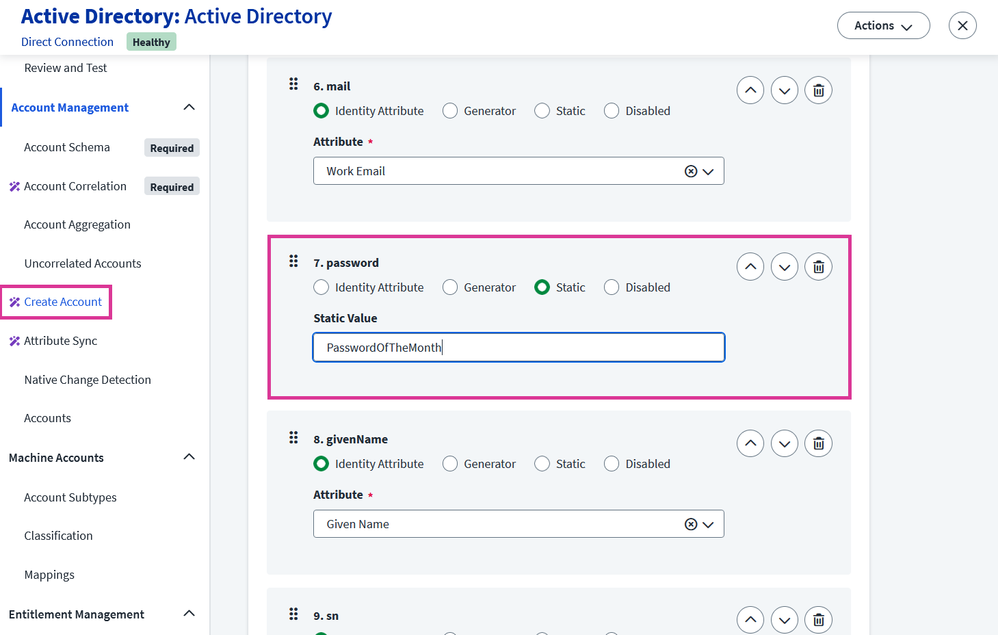
This is where a static password is defined as part of a source's account create profile. Often used for IT personnel who need to setup users’ laptops with a known credential. If going this route, we recommend changing this static password on a frequent basis (e.g. weekly, monthly, etc.), and as such as this option has been nicknamed "the password of the month club".
Advantages:
- Not data driven.
- Easily configured.
- Fairly easy for end users to understand.
- Good for IT admins who might need to setup and configure things on behalf of the user.
Disadvantages:
- Statically set and managed.
- Less secure if the password becomes widely known.
- Everyone has the same password initially.
Implementation:
To implement Option 1, configure a source's Create Account password attribute with the Static option and set the static value with a hardcoded string value:
Option 2 - Dynamic ’Known’ Password
With this option, you can set the initial password of the account to something that an end user might already know. This could be a simple attribute like birthday, phone number, employee ID, middle name, etc. as long as you have the information in Identity Security Cloud on the identity model. This could even some combine a set of attributes (e.g. employee ID + birth year). Since these are data-dependent, they can be susceptible to problems with the data - missing, incomplete, or incorrect data may render people unable to login. In addition, if using things the user might know, avoid using information which might be easily available on social media (e.g. birthday).
Advantages:
- Everyone has a different password initially
- Fairly easy for end users to understand
Disadvantages:
- Data dependent
- Could be susceptible to attack, based on information widely available on social media
Implementation:
To configure Option 2 in the Create Account, you could select the Identity Attribute option and select a single identity attribute from the drop-down menu:
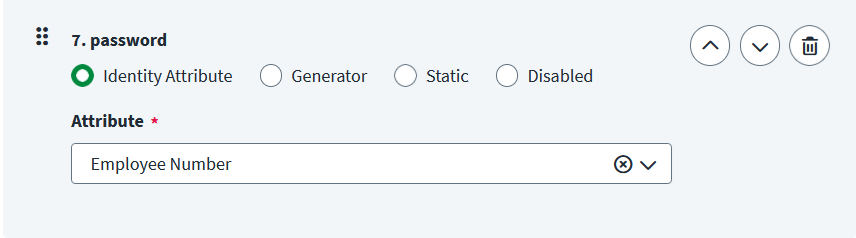
To apply a password value of multiple identity attributes concatenated together, you will need to apply Transform logic to the account attribute, and this must be achieved with the REST API, specifically a PUT or PATCH of the source's 'provisioning policy.'
Option 3 - Dynamic ’Unknown’ Password and Password Reset
With this option, a dynamic password will be generated by Identity Security Cloud, and no-one (not even Identity Security Cloud) knows what the password is. Once the account has been provisioned, in order to gain access to the account the user should change their password by using the ‘Forgot Password?’ option for that application or service. The end user needs a form of strong authentication in order to proceed. This is the most secure option, but is also the most inconvenient.
(Additional information on resetting an Identity Security Cloud password is available in User Help.)
Advantages:
- Everyone has a different password initially.
- Not data driven.
- Easily configured.
- Most secure option.
Disadvantages:
- Inconvenient. Requires end user to reset their password.
Implementation:
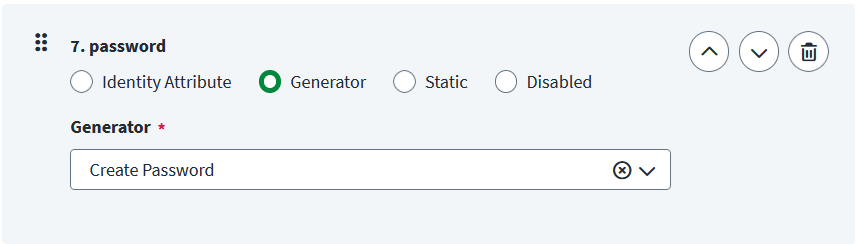
As easy way to implement Option 3 is to use the password Generator provided in the Create Account page:
You may be saying, why can't Identity Security Cloud just email the password out? Well, the reason is that emailed passwords are intrinsically insecure, and Identity Security Cloud will not send out passwords via email.
Hopefully this guide has been informative on how you might configure the options in Identity Security Cloud. If you need further clarification, drop us a comment below!